
 ChatGPT
 Claude
 Perplexity
 Grok
GrokA yearly planner online is a digital tool that displays your full 12 months in one view with calendar sync, sharing, and printing. The best ones in 2026 sync with Google Calendar, overlay multiple calendars, and manage tasks alongside events. We tested 7 options against these criteria : Fantastical, Kalnext, AnnuCal, Glance, Notion year templates, Teamup, and Google Sheets DIY.
Every team I have worked with eventually hits the same wall : meetings live in Google Calendar, the strategic plan lives in Excel, and by July neither talks to the other. A yearly planner online is the layer that makes the year visible without forcing you to leave your calendar data behind.
I tested every serious option on the market in May 2026. Below is the honest ranking by criteria, who each tool is for, where it shines, and where it falls short.
What to look for in a yearly planner online
Before the rankings, the framework. I evaluated each tool against seven criteria :
- 12-month view on one screen : a true year grid, not just a wide month view
- Sync with Google Calendar (and ideally Microsoft 365 / Outlook) : the planner reads and writes your existing calendar data, no re-entry. A one-way import does not count, and the difference matters more than it sounds
- Multiple calendars overlay : show 2 to 10 calendars at once (work, personal, team, role-based)
- Drag-and-drop event editing from the year view : move and resize without opening a modal
- Sharing : publish a calendar to teammates or external viewers
- Task management : tasks with duration and importance, not just todo lists
- Print and PDF export : the year on paper for wall mounting
These are the criteria a working operator cares about. Aesthetic templates and journaling features did not make the cut. They all come back to the same question : can somebody act on the plan without opening the tool you built it in? That is what we call executable planning.

The 7 best yearly planners online in 2026
| Rank | Tool | Best for | Free tier | Starting price |
|---|---|---|---|---|
| 1 | Fantastical | Premium calendar app with year view, Apple-first plus Windows | Yes (basic) | Premium subscription |
| 2 | Kalnext | All-in-one (year view + tasks + multi-cal overlay + free time finder) | No (14-day trial) | 24 USD / year |
| 3 | AnnuCal | Methodology-led free option, three view modes | Yes (1 scenario, 3 cals) | 3.90 EUR / month |
| 4 | Glance | Lightweight year view on Google Calendar | Yes (free entry) | Not disclosed |
| 5 | Notion year templates | Customizable DIY, free with any Notion account | Yes (with Notion Free) | Free |
| 6 | Teamup | Shared calendar for organizations (caveat : no true year grid) | Yes (5 sub-cals, 5 users) | 12 USD / month |
| 7 | Google Sheets DIY | Free fallback for power Sheets users | Yes (free with Google account) | Free |
Read on for the criteria-by-criteria breakdown of each option.
1. Fantastical, the premium calendar app with year view across Apple and Windows
Fantastical from Flexibits is the most polished calendar app in this list and the only one with a true year view available as a primary view mode on Mac, iPhone, iPad, Apple Watch, Apple Vision Pro, and Windows. It is not strictly a yearly planner (it is a full-featured calendar app), but its year view is genuine and on par with the dedicated tools.
Key features
- Day, week, month, quarter, and year full-screen views
- Native sync with iCloud, Google Calendar, Microsoft 365 / Exchange, Fastmail, and other CalDAV accounts
- Natural language event creation (“Lunch with Sarah on Friday at noon”)
- Fantastical Scheduling (book-a-time links similar to Calendly)
- Calendar sets (toggle groups of calendars on and off)
- Weather, conference call detection, time zone support
- Family sharing (up to 5 members on Family plan)
- Team plan with SSO and openings with multiple hosts
Pricing
Fantastical offers a free tier with core calendar features and a Premium subscription that unlocks all advanced features (priority support, Scheduling, advanced views, etc.). The Premium tier is available as Individual, Family (up to 5 members at reduced pricing), and Team (per-user pricing with SSO). Specific monthly and annual rates are listed on the Flexibits pricing page. A 14-day free trial of Premium is available with no upfront payment.
Where Fantastical shines
- The most polished UX in this list. Years of design refinement, native Apple platform integration, premium feel.
- Natural language event creation is the fastest way to add events of any tool here.
- Genuine year view included in both free and premium tiers, accessible as a full-screen mode.
- Multi-provider sync : iCloud, Google Calendar, Microsoft 365, CalDAV in one app. The most unified provider story of any tool in this list.
- Available on Windows, not just Apple. Recent addition that broadens the audience.
Where Fantastical falls short
- No task management with duration or importance. Has a basic Reminders integration on Apple but nothing like Kalnext’s duration + importance fields.
- No multi-account overlay across roles the way Kalnext does : you connect accounts but the year view does not specifically optimize for role-based planning.
- Premium subscription needed for advanced views and features including Scheduling and openings.
- Web app is limited : Fantastical is best as a native app. Web access goes through flexibits.com’s account portal, not a full web client.
Best for
Apple ecosystem users who want a polished calendar app with year view as one of many capabilities, people who already pay for Apple services and want the best-in-class native experience, professionals who switch between Mac and Windows.
2. Kalnext, the all-in-one yearly planner with tasks and multi-calendar overlay
Disclosure : I build Kalnext. I included it here because it is genuinely the most complete option on the seven-criteria grid I defined above, but I will be explicit about where it loses to Fantastical and others.
Key features
- 12-month grid in horizontal and vertical layouts, on all plans
- Native Google Calendar and Microsoft Outlook sync, real-time, bidirectional
- Multi-account overlay : connect multiple Google accounts (work + personal + role-based)
- Drag-and-drop reschedule and drag-to-resize events directly from the year view
- Task management with duration and importance (a workaround that Google Tasks does not natively support)
- Free time finder across your calendars and your teammates’
- Dynamic sharing with unlimited audience on team plans
- Print and PDF export
- Team workspaces with invited teammates
Pricing
| Plan | Price | Seats | Calendars per seat |
|---|---|---|---|
| Solo | 24 USD / year | 1 | 3 |
| Starter | 49 USD / month | 10 | 10 |
| Business | 99 USD / month | 30 | 30 |
| Enterprise | 199 USD / month | 100 | 100 |
All plans include a 14-day free trial, no credit card required. Nonprofits and education get 50 percent off.
Where Kalnext shines
- All seven criteria covered natively. The only tool in this list that ticks every box.
- Best feature breadth per dollar. Solo at 24 USD per year is the most affordable plan with full feature parity.
- The free time finder is exclusive. No other tool in this list highlights available slots across multiple calendars in one click.
- Tasks with duration and importance : Kalnext stores these in the Google Tasks placeholder so the data stays in your Google account, but the UI exposes them as first-class fields.
- Dynamic sharing has no audience cap from the Starter plan. Public publishing of a calendar to a wide external audience is a use case Fantastical does not target.
Where Kalnext falls short
- No free tier. The 14-day trial requires Google sign-in. If you need a permanent free option, Fantastical Free or AnnuCal Free are better entry points.
- No iCloud or CalDAV sync. Kalnext connects Google Calendar and Microsoft Outlook natively, both two-way, but Apple accounts are not supported. Fantastical wins on provider breadth with iCloud, Google Calendar, Microsoft 365, and CalDAV in one app.
- No standalone mobile app yet. The web app is mobile-responsive, but a native iOS / Android app is not shipped.
- Younger product. Fantastical and AnnuCal have a longer history and more customer reviews available.
Best for
Operators, project managers, and team leads who plan a year out with tasks and events together, freelancers and consultants managing multiple client engagements, anyone who has felt the pain of Google Tasks lacking duration.
3. AnnuCal, the methodology-led free option with three view modes
AnnuCal is the most opinionated of the seven on how you should plan a year. Their core idea : mark time first (block date ranges), then add the details. The product follows that philosophy, with three distinct view modes : linear (months side by side), vertical (timeline), and weekend (highlight weekends).
Key features
- 3 view modes (linear, vertical, weekend-aware)
- Scenario-based planning : test different year scenarios before committing
- Public holidays integrated (Pro adds school holidays)
- Read-only sharing of year or individual tabs
- Dark mode and custom colors (Pro)
- PDF export (Pro)
Pricing
| Plan | Price | Limits |
|---|---|---|
| Personal Free | 0 EUR | 1 scenario, 3 calendar tabs per scenario, unlimited events |
| Personal Pro | 3.90 EUR / month | Unlimited scenarios and calendar tabs, + Pro features |
A 14-day Pro trial is available with no upfront payment.
Where AnnuCal shines
- Strong free tier : unlimited events, 3 calendar tabs, read-only sharing. The most generous free option for personal use.
- The methodology is actually documented and consistent in the product. If you want a tool that nudges you toward a planning ritual (mark time first), AnnuCal is the best fit.
- PDF export looks polished thanks to the dark mode and custom color customization in Pro.
Where AnnuCal falls short
- Google Calendar sync only goes one way. AnnuCal added an import in July 2026, so your existing events now show up in the year view. Their changelog is explicit about the limit : “The import is one-way. You edit these events in Google, not in AnnuCal.” Anything you plan inside AnnuCal still has to be re-entered in your calendar by hand. We break this down in Kalnext vs AnnuCal.
- No Microsoft Outlook support of any kind.
- No task management beyond scenario-level event blocks.
- Sharing is read-only. Viewers cannot interact, only view.
- Solo / one-author tool by feel, less commercial muscle than Fantastical or Kalnext.
Best for
Solo planners who want a clean visual ritual, students mapping an academic year, anyone who plans 12 months in scenarios (sabbatical, gap year, training plan) rather than as a live calendar.
4. Glance, the lightweight year view on Google Calendar
Glance (getglance.io) is the lightest option in the list. It renders your existing Google Calendar events into a year view with horizontal or vertical layouts and adjustable column widths. There is no task management, no team layer, no sharing layer. It does one thing.
Key features
- 12-month grid with months as vertical columns
- Horizontal year view and vertical timeline mode
- Column width adjustment to zoom into specific months
- Google Calendar integration (events sync automatically)
- Alignment options (by date or by weekends)
- Dark mode
- Available on web and Android
Pricing
Glance does not publish pricing on its landing page. The product offers a “Get started free” call to action but does not disclose paid tier limits or upgrade paths publicly. Treat this as a yellow flag and verify before committing.
Where Glance shines
- The cleanest year view for users who want only that. No bloat.
- Google Calendar sync works out of the box.
- Mobile-first feel on Android.
- Lightweight and fast to load.
Where Glance falls short
- Pricing opacity. Without published pricing, hard to plan a renewal or pitch to a procurement team.
- No iOS or desktop app advertised.
- No task management, no team features, no sharing.
- Smaller team behind the product based on public footprint.
Best for
Solo users on Android who want a minimal year view on top of their personal Google Calendar, and do not need tasks, sharing, or print export.
5. Notion year templates, the customizable DIY option
Notion is not a calendar app. But it has a thriving template community, and “year planner” templates are common in the Notion gallery. People use a database of date entries grouped by month, with gallery view or calendar view, plus rich notes per entry.
Key features
- Free Notion templates available for yearly planning
- Customizable beyond any dedicated tool : add any properties you want
- Rich text and embedded resources per entry
- Sharing through Notion’s built-in publish-to-web
Pricing
Notion’s Free plan supports one user, unlimited blocks for personal use. Plus, Business, and Enterprise plans scale up for teams. Year templates are free assets community members contribute or sell.
Where Notion shines
- Maximum flexibility. If you want a year planner that doubles as a journal, a project tracker, or a habit log, Notion is the only option that bends to your specific need.
- Free for personal use with the Notion Free plan.
- Templates are abundant : search “year planner” in the Notion gallery.
Where Notion falls short
- No native Google Calendar two-way sync. Notion Calendar (the recently launched companion app) syncs events into Notion but the year view in your database is manual.
- DIY setup cost is real. Expect to spend a weekend customizing a template before it works the way you want.
- No drag-and-drop year grid out of the box.
- No print or PDF export of the year view comparable to a poster.
- Not really a planner, it is a database with calendar properties.
Best for
Notion power users who already live in Notion and want their year inside the same workspace, builders who want full customization over UX and properties, anyone who treats yearly planning as journaling more than scheduling.
6. Teamup, the shared calendar for organizations (with caveats)
Teamup is the heavyweight of multi-calendar sharing for organizations : schools, sports clubs, churches, municipalities. It does not have a true year view. I include it here because it ranks for “team planner” queries and people land on it expecting yearly planning, so the comparison matters.
Key features
- Multi-calendar layering with up to 150 sub-calendars on Enterprise
- Granular access permissions per sub-calendar (admin, modify, read-only)
- Custom fields per event
- Embedding and iCal feed
- Daily, weekly, monthly, list, and scheduler views
Pricing
| Plan | Price (billed yearly) | Sub-calendars | Users | Storage |
|---|---|---|---|---|
| Free | 0 | 5 | 5 | 250 MB |
| Plus | 12 USD / month | 12 | 12 | 2 GB |
| Pro | 30 USD / month | 25 | 25 | 20 GB |
| Business | 70 USD / month | 70 | 50 | 400 GB |
| Enterprise | 125 USD / month | 150 | 100 | 1 TB |
Organization accounts require a 1,200 USD per year base fee.
Where Teamup shines
- Best-in-class permission model for multi-stakeholder calendars (a school where the principal sees all, parents see their child’s class only).
- Free tier is usable for small clubs and teams.
- Embedding and iCal feeds are reliable and well-documented.
- Customer base proves the use case : World Economic Forum, City of Dublin, Princeton Review.
Where Teamup falls short
- No true year view. Monthly is the longest horizon. If you need 12-month visibility, Teamup is the wrong tool.
- No native Google Calendar sync. Calendars in Teamup are independent of your Google calendars (you can subscribe via iCal but it is one-way and slow to refresh).
- No task management.
- Pricing scales fast beyond small teams.
Best for
Organizations with many stakeholders and varied access needs : schools, sports clubs, religious congregations, municipalities, multi-site offices. Not the right tool for individual or small-team yearly planning.
7. Google Sheets DIY templates, the free fallback
The most honest free option. There are hundreds of Google Sheets year planner templates online, from minimalist 12-column grids to complex multi-sheet workbooks. They cost zero and live where your team already collaborates.
Key features
- Free with any Google account
- Total customization (you control every cell and formula)
- Native Google Drive sharing and access controls
- Print and PDF export through Google Sheets export
- Comments and revision history
Pricing
Free with a Google account. Templates from third parties are sometimes paid (5 to 30 USD on Etsy / Gumroad) but free templates abound.
Where Google Sheets DIY shines
- Free and infinitely customizable.
- Works for organizations already on Google Workspace with no new tool to introduce.
- No vendor lock-in.
- Versioning is automatic.
Where Google Sheets DIY falls short
- No calendar sync at all. You enter every event manually. By March, the sheet is out of sync with your real schedule.
- No notifications when events approach.
- Manual maintenance burden scales with calendar volume.
- Not really a calendar, it is a spreadsheet pretending to be one.
Best for
Teams who deeply trust Sheets, planners who treat the year as a strategic doc rather than a calendar, anyone allergic to new SaaS subscriptions.
How to pick the right online year planner for you
The honest answer depends on which criterion matters most.
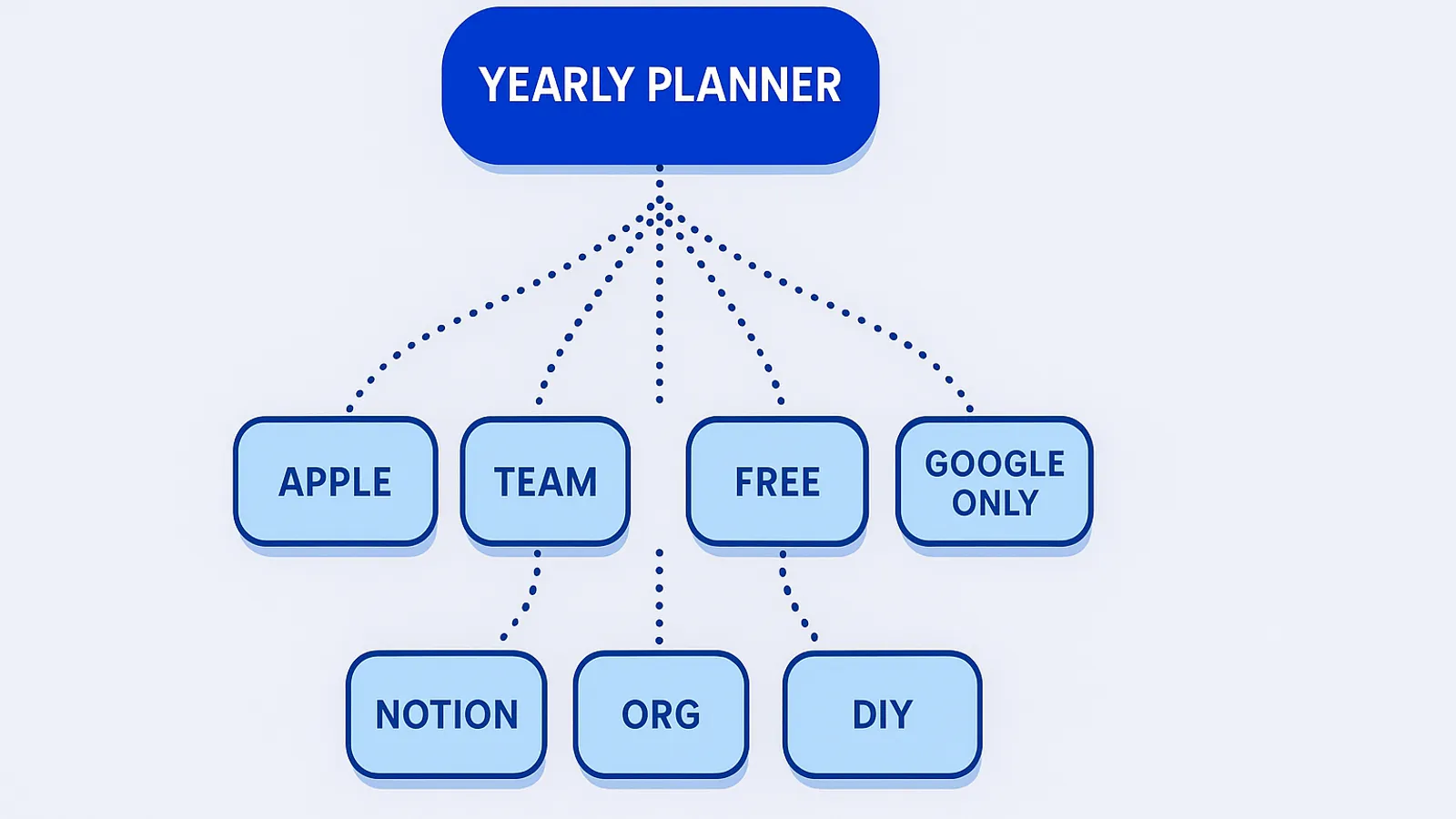
If you live on Apple devices and want a polished premium calendar : Fantastical
Fantastical is the only tool in this list that delivers a true year view as part of a premium calendar app on Mac, iPhone, iPad, Apple Watch, Apple Vision Pro, and Windows. It is also the only one with native iCloud, Google Calendar, Microsoft 365, and CalDAV sync in a single app. If you want best-in-class UX on Apple platforms and your year view does not need task management or team overlay, start here.
If you need an all-in-one with tasks + drag-and-drop + multi-cal overlay : Kalnext
Kalnext covers every criterion natively, including the ones the other tools lack (task duration, free time finder, drag-and-drop year edit). At 24 USD per year for Solo, it is the most feature-dense plan in the list. It syncs Google Calendar and Microsoft Outlook natively, both ways. The trade-off is no free tier and no Apple iCloud support. If your team has outgrown spreadsheets for annual planning, start a 14-day Kalnext free trial and see your year as a single visual.
If you want a free methodology-led tool : AnnuCal
AnnuCal’s free tier is the most generous for solo personal planning. The three view modes (linear, vertical, weekend) and the “mark time first” methodology nudge you toward a planning ritual rather than ad-hoc entry.
If you only need a clean year view on your existing Google Calendar : Glance
Glance does one thing well : render your existing Google Calendar as a year grid. No tasks, no team, no complexity. Free entry point on web and Android. The pricing opacity is the main risk.
If you already live in Notion : Notion year template
If your team’s knowledge base, project tracker, and meeting notes are all in Notion, adding a year planner template is the path of least resistance. Expect a weekend of customization before it works the way you want.
If you run an organization with many stakeholders : Teamup
For schools, clubs, congregations, and municipalities with complex permission needs, Teamup’s sub-calendar model is unmatched. Just know that you will not get a true year grid : Teamup tops out at monthly view.
If you want zero subscriptions and total control : Google Sheets
The free fallback works if your team is already on Google Workspace and you accept the manual maintenance burden. By July, expect to spend an hour reconciling the sheet with your real calendar.
Comparison table at a glance
| Criterion | Fantastical | Kalnext | AnnuCal | Glance | Notion | Teamup | Sheets |
|---|---|---|---|---|---|---|---|
| 12-month single view | ✅ | ✅ | ✅ | ✅ | ⚠️ DIY | ❌ | ⚠️ DIY |
| Google Calendar sync | ✅ | ✅ | ⚠️ One-way | ✅ | ❌ | ⚠️ iCal | ❌ |
| Microsoft 365 sync | ✅ | ✅ | ❌ | ❌ | ❌ | ❌ | ❌ |
| iCloud sync | ✅ | ❌ | ❌ | ❌ | ❌ | ❌ | ❌ |
| Multi-calendar overlay | ✅ | ✅ | ⚠️ Pro | ✅ | ❌ | ✅ | ❌ |
| Drag-and-drop edit | ⚠️ Day/Week | ✅ Year | ❌ | ❌ | ❌ | ❌ | ❌ |
| Sharing / publishing | ⚠️ Limited | ✅ | ⚠️ Read-only | ❌ | ✅ | ✅ | ✅ |
| Task management | ⚠️ Reminders | ✅ | ❌ | ❌ | ⚠️ DIY | ❌ | ⚠️ DIY |
| Print / PDF export | ⚠️ Basic | ✅ | ⚠️ Pro | ❌ | ⚠️ | ✅ | ✅ |
| Free tier | ✅ | ❌ | ✅ | ✅ | ✅ | ✅ | ✅ |
| Starting paid price | Premium sub | 24 USD/yr | 47 EUR/yr | Not disclosed | Free | 144 USD/yr | Free |
Frequently asked questions
The FAQ section below mirrors the questions Google surfaces in People Also Ask for “yearly planner”. See the FAQ schema attached to this page for the indexed answers.
What’s next
If you skim the table and one tool jumps out by criterion, start there. If you are not sure, follow this short rule :
- You want free first : Fantastical Free (Apple ecosystem) or AnnuCal Personal Free
- You want feature-complete : try Kalnext for 14 days
- You want zero cost and accept the DIY tax : Google Sheets
You can always export your year from one tool and import into another if you change your mind. The year is not a vendor lock.