Best YearGlance Alternative for Planners & Teams
A side-by-side comparison of YearGlance and Kalnext covering task management, event editing, calendar sharing, pricing, and yearly planning features.
Try it for free


Top performers from leading organizations rely on Kalnext




YearGlance vs Kalnext: What You Need to Know
YearGlance is a year planning tool that aggregates Google and Microsoft calendars into a single yearly overview. Its core strength is calendar sharing: organizations, schools, and associations can publish a shared calendar link where viewers toggle which calendars they see. Plans range from a free single-calendar tier to enterprise pricing with dynamic sharing for large audiences.

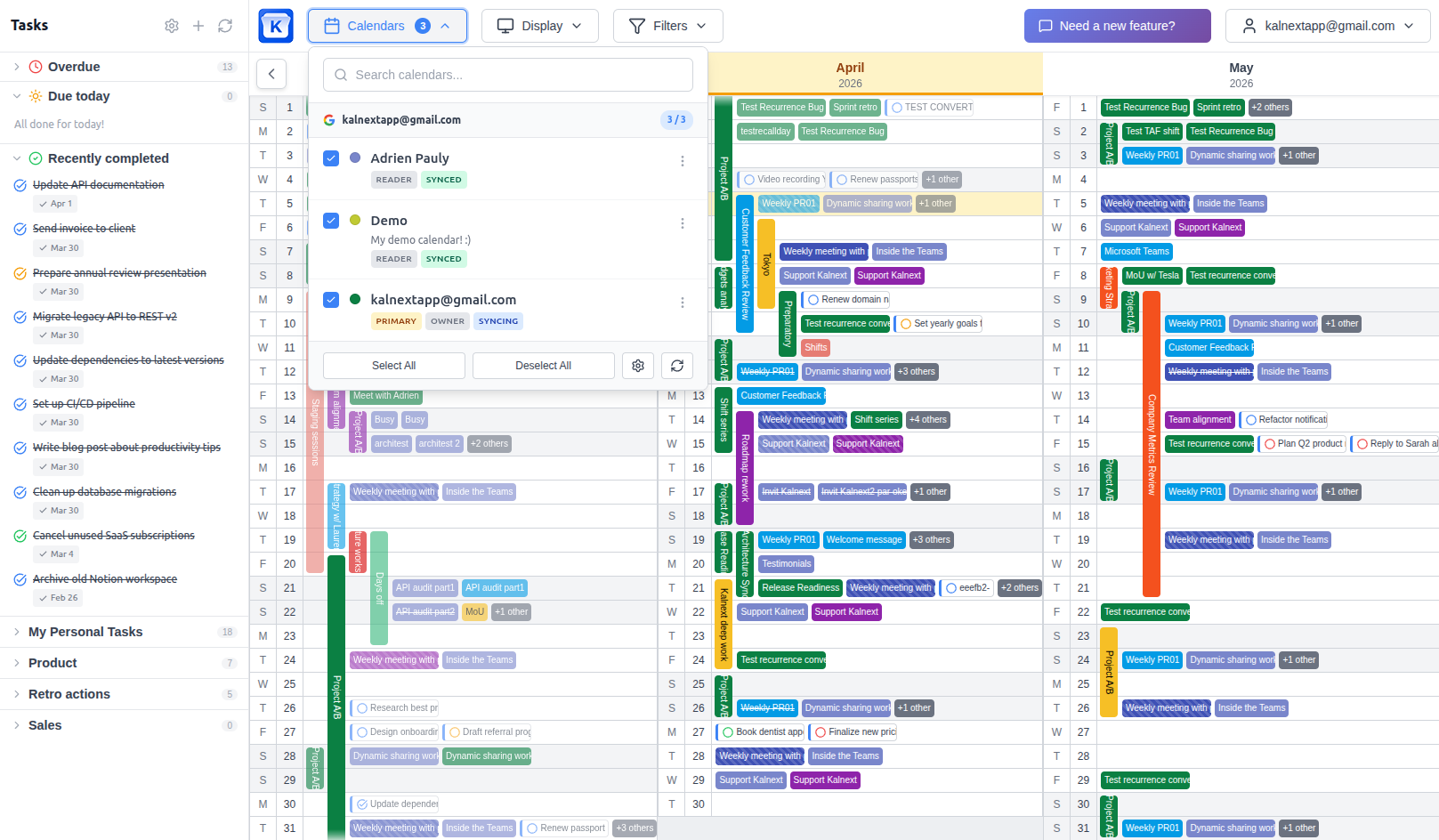
Kalnext is a yearly planner that syncs with Google Calendar and Outlook, including their tasks. Beyond calendar visualization, it offers full event management with drag & drop, task management with duration and importance levels, a free time finder, team collaboration, and dynamic sharing with no audience limits.
TL;DR
Choose YearGlance if you
- 1Only need calendar visualization without task management
- 2Want a free tier to get started with a single calendar
- 3Don't need advanced customization like filters, layouts, or task priorities
Choose Kalnext if you
- 1Need full task management with duration and importance levels
- 2Want to create, edit, drag and resize events from the year view
- 3Need a fast, responsive interface with real-time sync
- 4Want a free time finder to spot availability across calendars
- 5Need unlimited events and tasks with no caps
- 6Want to share your calendar publicly with no audience limits
YearGlance vs Kalnext: Features & Pricing
Last updated: April 2026
| YearGlance | Kalnext | |
|---|---|---|
| Starting price | Free (limited) | $24/year |
| Free trial | 14 days | 14 days |
| Google Calendar sync | Yes | Yes |
| Microsoft Calendar sync | Yes | Yes |
| Year view with event details | Yes | Yes |
| Daily view | Yes | Yes |
| Weekly view | Yes | No Coming soon |
| Horizontal and vertical layouts | Pro plans only | All plans |
| Task management | No | Yes |
| Unlimited task lists | No | Yes |
| Convert task to event | No | Yes |
| Event creation from year view | Basic | Full (fast) |
| Drag & drop reschedule | No | Yes |
| Drag to resize events | No | Yes |
| Free time finder | No | Yes |
| Advanced filters (color, type, keyword...) | Basic | Yes |
| Daily hour-by-hour details | Yes | Yes |
| Print & export | Yes | Yes |
| Team collaboration (invite teammates) | No | Yes |
| Dynamic sharing | From $800/year | From Starter plan ($49/month) |
| Audience size limit | 100 to 5,000 (by plan) | Unlimited |
| Event count limit | 1,000 to 150,000 (by plan) | Unlimited |
| Calendar history | Not specified | From 2 years to unlimited |
| NFP / EDU discount | 40% | 50% |
| Custom branding | Enterprise | Enterprise |
| Multiple Google accounts | From Pro plans | From Starter plan |
YearGlance vs Kalnext: Pros & Cons
YearGlance
Pros
- Free tier available for single calendar use
- Dynamic sharing for large audiences (schools, organizations)
- Share and embed calendar without viewer accounts
- Print and PDF export on all plans
- Clean, focused calendar visualization
Cons
- No task management at all
- Basic and slow event creation from the year view
- No drag & drop to reschedule or resize events
- No free time finder
- Event count limits on every plan (1,000 to 150,000)
- Dynamic sharing starts at $800/year with audience caps
- Generally slow interface and sync compared to alternatives
Kalnext
Pros
- Complete task management with duration and importance (exclusive)
- Full event management: create, edit, drag & drop, resize
- Free time finder across all your calendars
- Fast, responsive interface with real-time sync
- No limits on events, tasks, or task lists
- Dynamic sharing with unlimited audience on team plans
- Advanced filters by color, event type, and keyword
- Team collaboration with invited teammates
Cons
- No free tier (14-day free trial available)
- No agenda and week views yet (coming soon)
Why users switch from YearGlance
There is no way to manage tasks
YearGlance is strictly a calendar viewer. It displays your events but has no concept of tasks, to-do lists, or deadlines. If you track work with Google Tasks, none of it appears in your yearly overview. You end up with a blind spot: you see your meetings but not the actual work you need to deliver.
With Kalnext: Kalnext syncs with Google Tasks and shows them right alongside your events on the year view. You can create tasks with due dates, set duration and importance levels, and drag them to reschedule. Your planner reflects your real workload, not just your meeting schedule.
Editing events is slow and limited
YearGlance lets you create events, but the experience is basic and sluggish. There is no drag & drop to move an event to another date. No resize to extend a deadline. Every edit means opening a form, changing fields manually, and waiting for the sync to catch up. When you are planning across 12 months, that friction adds up fast.
With Kalnext: In Kalnext, you drag an event to reschedule it. Grab the edge to resize it. Click to create a new one. Every change syncs back to Google Calendar instantly. Planning feels fluid, not frustrating.
No way to find available time
YearGlance shows you what is scheduled but cannot help you find what is not. There is no free time finder. If you need to book a team offsite, schedule a vacation, or find a quiet week for deep work, you have to scan every month manually and cross-reference calendars yourself.
With Kalnext: Kalnext highlights available time slots across all your selected calendars with one click. You can also find shared free time with colleagues, which makes coordinating across teams effortless.
Hard limits on events and audience
Every YearGlance plan caps the number of saved events: 1,000 on free, 10,000 on Solo, up to 150,000 on Business. If you are an active planner, you will hit those limits. Dynamic sharing (where viewers can toggle calendars) is only available from $800/year, with audience caps of 1,000 to 5,000 people.
With Kalnext: Kalnext does not cap events, tasks, or task lists on any plan. Dynamic sharing with unlimited audience is included on team plans starting at $49/month.
Who should use YearGlance vs Kalnext?
YearGlance is a good fit if you
- Want to share a read-only calendar with a large external audience
- Only need calendar visualization without task management or event editing
- Are a school or association looking for public calendar sharing
Kalnext is a better fit if you
- Need to manage tasks and events together on a yearly view
- Want fast event creation, drag & drop, and resize from the planner
- Need to find free time across your calendars or your team's
- Want unlimited events and tasks with no caps on any plan
- Need team collaboration where teammates see each other's calendars
- Want a fast, real-time interface that doesn't lag
Don't just take our word for it
"We built our own rolling planning system for our company and needed a way to make this come to life in Google Calendar. We'd been using an open source planner for this but it lacked the user interface, ease of use and support that we needed to scale. Kalnext solved this problem for us."
Rob Castaneda
ServiceRocket · February 2026
"It is a great product! I have dreamed more than 10 years to have this kind of annual viewer/planner since Google did not prepare this option for long."
Ryo Sasaki
International Development Center of Japan · April 2026
How to switch from YearGlance
No data migration needed. Just connect your Google Calendar or Outlook.
Switching from YearGlance? Get 30% off your first year.
A welcome offer reserved for YearGlance users: 30% off your first year on any Kalnext plan. Reach out to claim it.
Contact us to claim your discountSign in with Google or Outlook
One click to connect your Google or Microsoft Outlook account. No sign-up form, no credit card. Your 14-day free trial starts instantly.
Your calendars appear instantly
All your calendar data loads in seconds. No import, no migration. You see your full year right away.
Invite your team
Add teammates to your workspace so you can see each other's calendars and plan together.
Start planning
Explore your full year, create tasks, find free time, and manage events. All synced in real time.
Frequently asked questions
What is the best alternative to YearGlance for yearly planning? +
If you need more than calendar visualization, Kalnext is the strongest alternative. It covers the same year view functionality and adds task management, drag & drop event editing, a free time finder, and real-time Google Calendar sync with no event limits.
Why do people switch from YearGlance to Kalnext? +
The most common reasons are the absence of task management, the slow event editing experience, no free time finder, and event count caps on every YearGlance plan. People who actively plan (rather than just view) their calendar tend to outgrow YearGlance quickly.
How does pricing compare between YearGlance and Kalnext? +
YearGlance offers a free tier for a single calendar. Paid plans start at $150/year for basic sharing (up to 100 viewers) and $800/year for dynamic sharing (up to 1,000 viewers). Kalnext starts at $24/year for solo users with unlimited events. Team plans with dynamic sharing and unlimited audience start at $49/month, and scale to $199/month for enterprise (compared to $2,500/year on YearGlance for 5,000 viewers).
Does YearGlance support task management? +
No. YearGlance is purely a calendar visualization tool. It does not support tasks, to-do lists, or any form of task tracking. If you use Google Tasks, they will not appear in YearGlance. Kalnext syncs with Google Tasks and adds features like duration and importance levels that Google Tasks itself does not offer.
Can I drag and drop events in YearGlance? +
No. YearGlance does not support drag & drop for rescheduling or resizing events. Every change requires manually editing the event details. Kalnext lets you drag to reschedule and resize both events and tasks directly on the planner.
Does YearGlance work with Microsoft Calendar? +
Yes. YearGlance natively supports both Google and Microsoft calendars. Kalnext does too: you can connect Google Calendar and Microsoft Outlook natively, with no linking workaround required.
Are there limits on events in YearGlance? +
Yes. Every YearGlance plan has a cap on the number of saved events: 1,000 on the free plan, 10,000 on Solo, 50,000 on Team, and up to 150,000 on Business. If you are an active planner with years of calendar data, you may hit these limits. Kalnext has no event or task limits on any plan.
Is YearGlance or Kalnext better for schools and organizations? +
It depends on the use case. YearGlance is strong for publishing a shared calendar to a large external audience (parents, members) with its dynamic sharing feature. Kalnext is better for teams who need to plan together, manage tasks, find shared availability, and actively edit their schedule from a yearly view. That said, Kalnext also supports dynamic sharing to a large external audience, with no audience limit on team plans.
Compare Kalnext to other planners
Ready to try Kalnext?
See why teams choose Kalnext over YearGlance. Full access for 14 days, no credit card required.
Start your free trial14-day free trial · No credit card required