
 ChatGPT
 Claude
 Perplexity
 Grok
GrokAn annual planner is a 12-month view of every commitment a team has already made: launches, cadences, time off, travel. For an ops manager the useful version is the team’s real calendar laid out across 12 months, so conflicts show up months early and the plan stays current because it is the calendar people already use.
Every ops manager I know has built an annual planner at least once. A spreadsheet with 12 columns, or a slide with four quarters, filled in January with the launches, the offsites, the hiring plan and the board dates. By March it is a little wrong. By July nobody opens it, because the calendar everyone actually reads has moved on without it.
The problem was never the planner. It was that the planner and the calendar were two different objects, and only one of them had the meetings in it.
This guide is the method I use with teams of 5 to 50 people to build an annual planner that survives the year: what it is, the 6 steps, the quarterly rhythm that makes it useful, and the one design choice, a rolling horizon, that keeps it from expiring.
What an annual planner is, and what a January template is not
Asana defines annual planning as “the process of setting goals, strategies, and priorities for the upcoming fiscal year based on insights from the previous year’s performance.” That is the plan: goals, budgets, owners. It lives in a document and it is written once.
The annual planner is where the plan meets the clock. It answers a smaller question than the plan, and a harder one: when. When does the launch land, and is that the same week the two people who can ship it are on leave? When is the board meeting, and does the quarterly review fit before it? When does the contract renew, and who is around to negotiate it?
An annual planner, then, is a view of the next 12 months with every dated commitment on it, dense enough to show where things collide and light enough to read in one glance. The template you fill in January fails on both counts: it holds intentions, and it is frozen on the day you export it.
The distinction matters for what you put on it. An annual planner is for commitments that lock weeks or months: launches, quarterly cadences, hiring waves, time off, travel, audits, renewals. Weekly meetings do not belong there. If you have read our piece on the 12-month calendar view, this is the same discipline, applied to the decisions that shape the year instead of the events that fill it.
Why annual plans die by July
Three things happen to a planner built in January, in this order.
It gets copied. The plan lives in the spreadsheet and the meetings live in Google Calendar or Outlook. Someone types the launch week into the calendar as an all-day event. Someone else forgets to type the offsite. The planner and the calendar agree on the day they are both created and start drifting the day after.
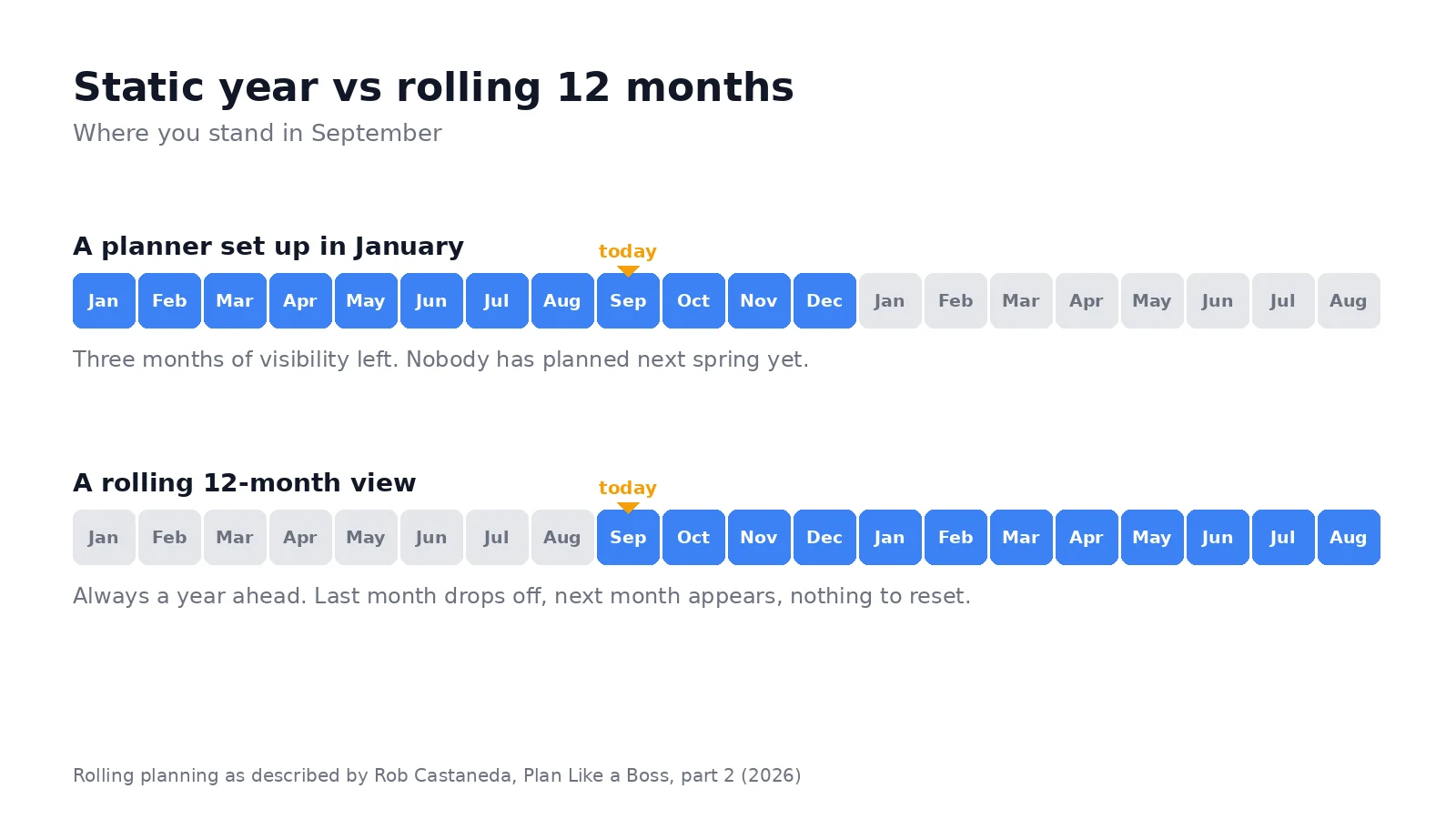
It stops rolling. In September a January planner shows three months of future. Next spring’s hiring wave, which needs to start in February, is off the edge of the page. The team plans the last quarter with a quarter’s worth of visibility, which is exactly when the most expensive collisions happen.
It loses trust. Once two people have been burned by a stale planner, they stop reading it and go back to asking in Slack. A planner nobody reads is worse than no planner, because the one person who still believes it plans against wrong data.
Rob Castaneda, who runs ServiceRocket and published his own planning method in January 2026, puts the goal in one line: “Success is identifying conflicts far into the future so you have time to adjust.” Every step below exists to give you that distance.
The method in 6 steps
The method borrows its vocabulary from Castaneda, because it is the clearest public description of a working annual planner I have found, and I have not seen an ops team that could not adapt it.
1. List the streams that generate commitments
Castaneda starts with roles, because as a CEO he plans one calendar per hat he wears: Husband, Father, CEO, Entrepreneur. For an ops manager the equivalent is streams. Product, sales, hiring, finance, people, plus your own leave. Each stream produces its own dated commitments, and collisions between streams are where years go wrong.
Write the list down. Five to eight streams is typical. If you have fifteen, some are meetings, not streams.
A typical list for a 30-person software company, to make it concrete: product releases, customer onboarding waves, hiring, finance and legal dates, team leave, and the founder’s travel. Six streams, six colors. When a year goes wrong, it is almost always because two of them landed on the same weeks.
2. Source the fixed dates before you plan anything
Every stream has dates you do not control: public holidays, school breaks if the team has parents, the fiscal year end, board meetings, the trade show, the contract renewals. Collect them first, from the source calendars, before you place a single decision. Planning around a fixed date you discover in month eight is the most common cause of a blown quarter.
This is the step people skip because it is boring. It takes an afternoon once and saves the year.
Where the dates come from, in practice: the public holiday calendar of every country you operate in, the school calendar if parents on the team plan leave around it, the finance calendar (close, audit, tax deadlines, fiscal year end), the board and investor schedule, the events you have already paid for, and the renewal date of every contract above a threshold you choose. Most of these already exist as calendars you can subscribe to, which is exactly why they belong in step 3.
3. Put each commitment on the shared calendar as an all-day event
Here the method departs from the spreadsheet. Every commitment goes into the calendar the team already reads, as an all-day event, one color per stream, spanning its real duration. The launch week is five days, so it is a five-day event. The hiring wave is eight weeks, so it spans eight weeks.
Do not make a separate planning calendar that nobody subscribes to. Use the calendars people already have open, or a shared one they are already subscribed to. The point is that when someone moves the offsite, the planner moves with it, because they are the same thing. We have written at length about why a plan that lives next to the calendar decays, in Planning tools vs your calendar, and the short version is that a plan you have to copy somewhere is not finished. The same idea in one page, with the principles behind it, is our executable planning manifesto.
4. Give every quarter the same three-month rhythm
This is the part of Castaneda’s method that ops teams adopt fastest. Each quarter has three kinds of month:
- Super month (first month): plan the quarter, review last quarter’s results, align the leadership team. Workshops, all-hands and planning meetings go here.
- Middle month: execute. Protect the team from planning overhead. This is also the best place for time off, because nothing is starting or closing.
- Closing month: finish what is open, support the people who are shipping, and prepare the next super month.
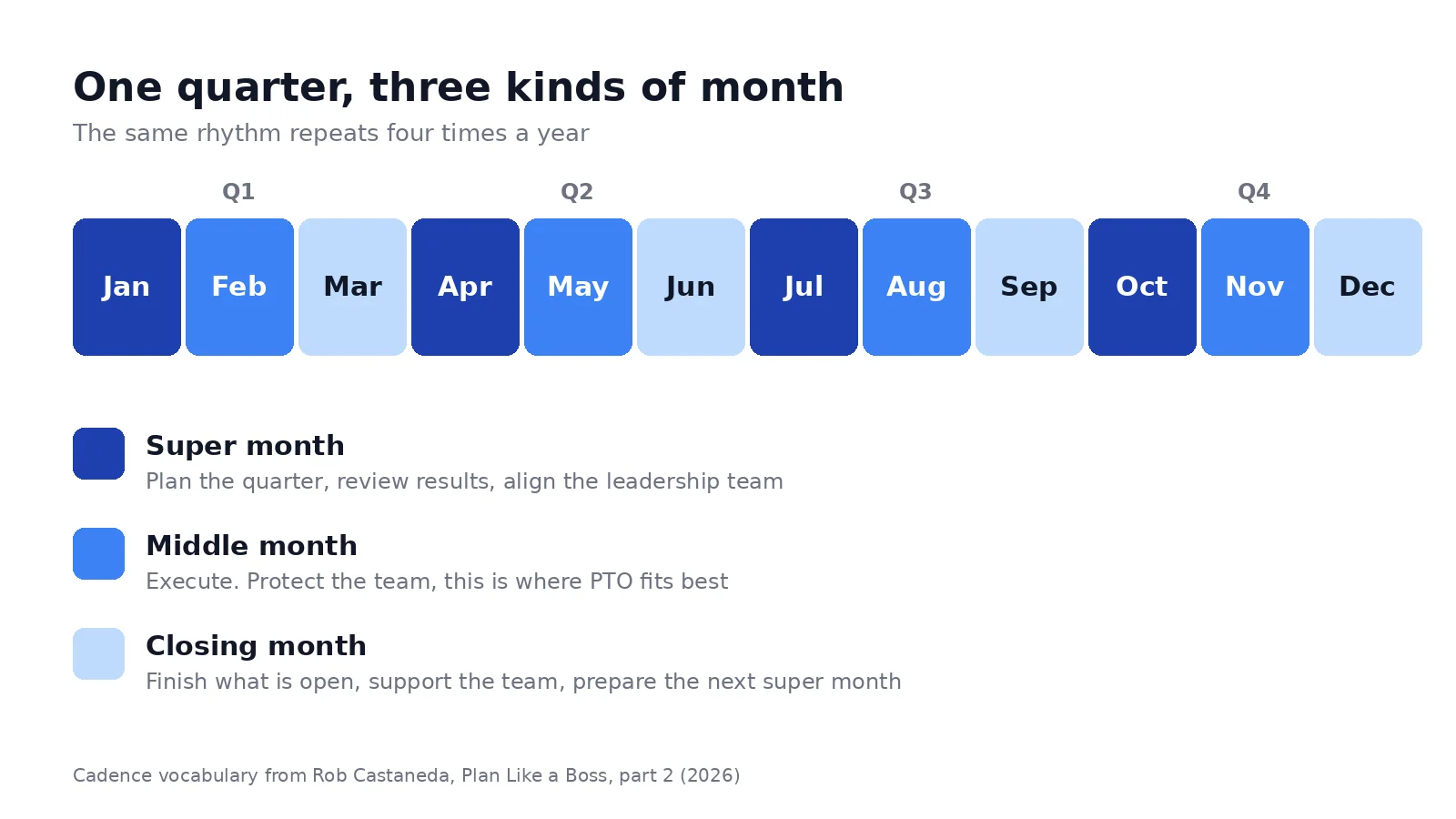
Once the rhythm is on the calendar it does two things. It tells you where a launch should land (late middle month or early closing month, never the super month). And it makes the same collisions visible four times a year, so you learn to see them.
5. Make the horizon roll
Set the planner to show the next 12 months from today, not January to December. Castaneda calls this the rolling 12-month view and treats it as the difference between a planner that stays forward-looking and one that goes stale mid-year.
In practice this means that in your monthly review you look at the next 12 months, and that a commitment 11 months out is already on the surface. The spring hiring wave shows up in September. The renewal in March shows up in May of the year before.
On a year view tool this is a setting: the viewport starts on the current month and re-anchors with a click. On a spreadsheet it means adding a column every month and deleting one, which is why it never happens on a spreadsheet.
6. Review it monthly, and put it on the wall
A planner without a ritual is wallpaper. The ritual is short:
- Monthly, 30 minutes, first working day. Open the 12-month view. Confirm next month is locked. Move whatever drifted in the two months after. Add the leave and the travel that surfaced since.
- Quarterly, 90 minutes, in the super month. Walk the next two quarters with the people who own the streams. Look for density, collisions and empty weeks. Move what is movable.
Castaneda adds a physical step: he prints the year view on A1 paper every month or two, posts it where the team walks past, and annotates it by hand between prints. His reasoning is that “your brain works well when you see signs in the physical plane.” An ops manager gets the same effect from a printed year pinned next to the desk, and the reprint is a forcing function for the monthly review.
How an ops manager runs it, how a COO runs it
The method is the same. The streams and the review cadence differ.
Ops manager, 5 to 50 people. Streams are product, hiring, sales cycles, people (leave, onboarding) and finance dates. The planner is mostly about capacity: which weeks have two people out, which month has both a launch and a hiring wave, where the quiet weeks are for the project that keeps slipping. The monthly review is with the team leads. The quarterly review is with the founder.
The typical first discovery is two weeks in the year where nobody is around and nobody had noticed, and one month where three streams peak at once. Both were on the calendar all along, in separate calendars. See overlaying multiple calendars for why the overlay is the step that makes them visible.
A worked quarter, to show what the method changes. October is the super month: the quarterly review happens in week 1, the leadership offsite in week 2, and the Q4 hiring wave opens in week 3 so that interviews run through the middle month. November is the middle month: the release that was planned for the first week of December moves into the last week of November, because the year view shows December already carrying the finance close and two people on leave. December is the closing month: the release is supported, the open positions are closed or rolled into Q1, and the January super month is prepared before the holidays, with the whole team still around. None of these moves needs a meeting. They need someone looking at the 12 months with the leave and the finance dates on the same grid.
COO or department head, 50 to 500 people, several offices. Streams become roles and offices. The planner is about cadence more than capacity: board cycles, executive workshops, all-hands, time-zone-aware travel. Castaneda’s own list has six roles, and part of the value for him is seeing where his CEO hat and his Father hat collide. The quarterly review is the super month workshop with the leadership team, and the printed year on the wall replaces a lot of status meetings.
In both cases the planner earns its keep the first time it shows a collision three months early. After that nobody argues about keeping it current.
Common pitfalls
Building it as a separate calendar. A planning calendar that only the ops manager subscribes to is a spreadsheet with extra steps. Use the calendars the team reads, or the planner will drift like the spreadsheet did.
Plotting meetings. The weekly team meeting does not lock a week. Keep the planner for commitments that span days or more. If everything is on it, nothing stands out.
Freezing it in January. The rolling horizon is the whole point. A planner that ends on December 31 has already failed by autumn.
Skipping the fixed dates. The audit, the trade show and the school holidays will not move for your launch. Source them first.
Updating it once. A planner that is six weeks stale is a liability. The monthly review is not optional; it is the planner.
Confusing it with the plan. The planner does not replace the goals document or the budget. It is where their dates go. Keep both, and keep them in different places.
Tools in the method
Three tools cover most teams. The order below is the order in which teams usually try them.
A spreadsheet. Good for the plan (goals, owners, budget). Bad for the planner, for the reasons above: it does not roll, it does not sync, and it is not where the meetings are. If you want a blank grid to start on paper, our free printable calendar gives you 12 months on one sheet with no signup.
Google Calendar or Outlook on their own. They already hold the commitments. Google Calendar’s Year view, listed in the view selector next to Day, Week and Month, shows which days have events, but not what they are, and nothing can be edited from it. Outlook has no year view at all. Both work for steps 2 and 3 of the method, and neither gives you the 12-month surface for steps 4 to 6. We have documented the gaps in Google Calendar year view limitations.
A year view synced with your calendar. This is where most teams end up. Kalnext connects to Google Calendar or Microsoft Outlook, renders 12 months of it on one screen, horizontal or vertical, and syncs both ways: drag the launch week to the closing month on the year view and it moves in the calendar for everyone who shares it. Several calendars overlay on the same grid, tasks sit next to events with a duration and a priority, a free time finder marks the open weeks, and the year prints on A2 or A3 for the wall. The rolling horizon is the default viewport. The trial is 14 days and does not ask for a card.
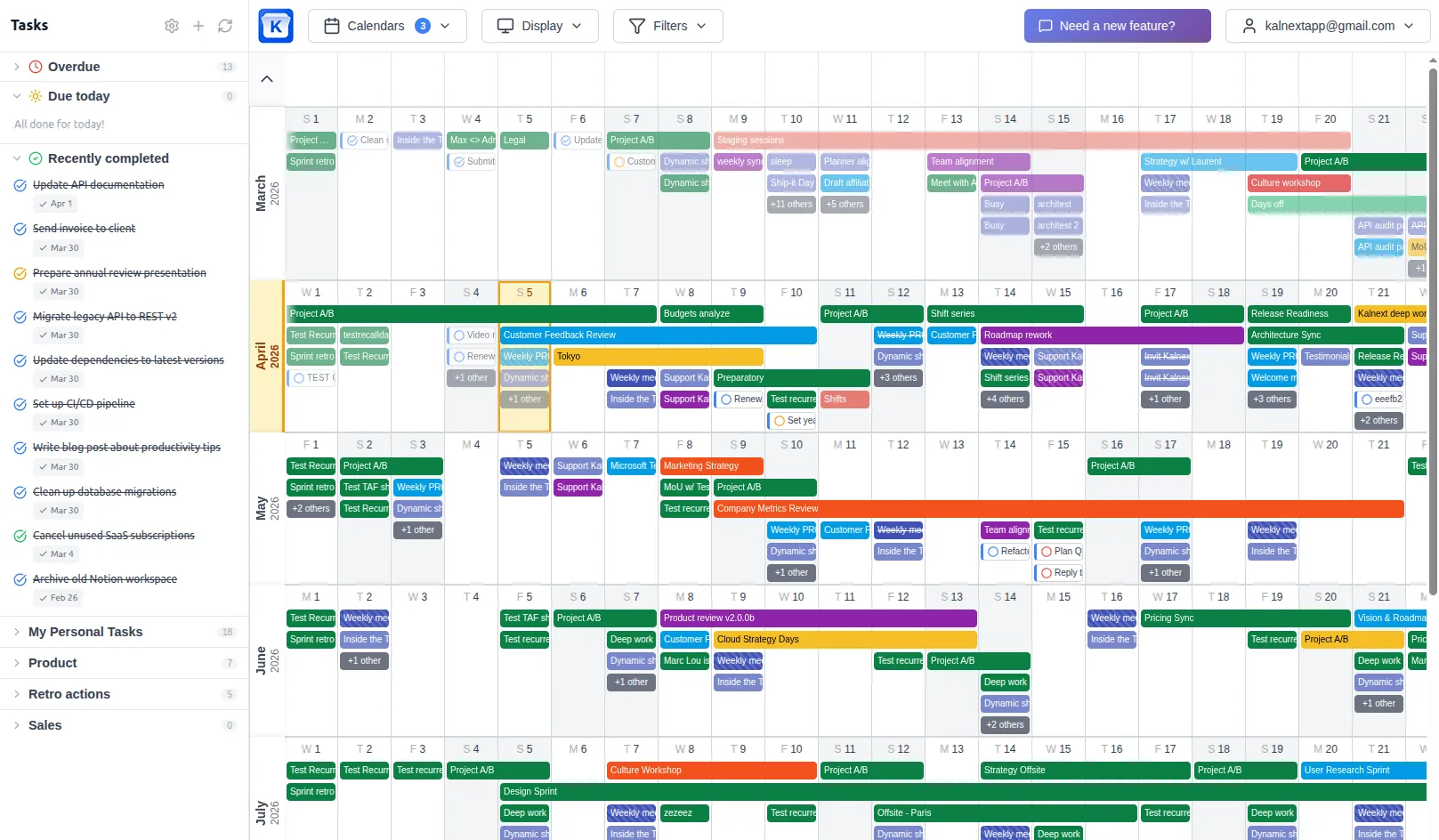
Other year view tools exist, with different trade-offs on sync, tasks and price. We compared seven of them in our ranking of yearly planners online.
What’s next
If it is September, the timing is on your side: the next super month is a few weeks away, and a rolling planner set up now already shows next summer. Pick your streams this week, source the fixed dates over an afternoon, and put the first quarter’s cadence on the shared calendar. Then run one monthly review on a 12-month view and see what it shows you that the spreadsheet did not.