Best AnnuCal Alternative for Planners & Teams
A side-by-side comparison of AnnuCal and Kalnext covering task management, event editing, calendar sharing, pricing, and yearly planning features.
Try it for free


Top performers from leading organizations rely on Kalnext





AnnuCal vs Kalnext: What You Need to Know

AnnuCal is a German year planner built around what it calls "time-first planning": you block periods of time on a 12-month canvas first, then add the details. It offers linear, vertical and weekend year views, a project timeline, a ring view of the year, multiple scenarios, ready-made templates and link sharing. Google Calendar events can be imported since July 2026, but the import is one-way and read-only: AnnuCal is a planning space next to your calendar, not a way to work in it. Plans are Free, and Pro at 99 EUR per year (or 12,90 EUR per month), and every new account starts with 30 days of Pro.

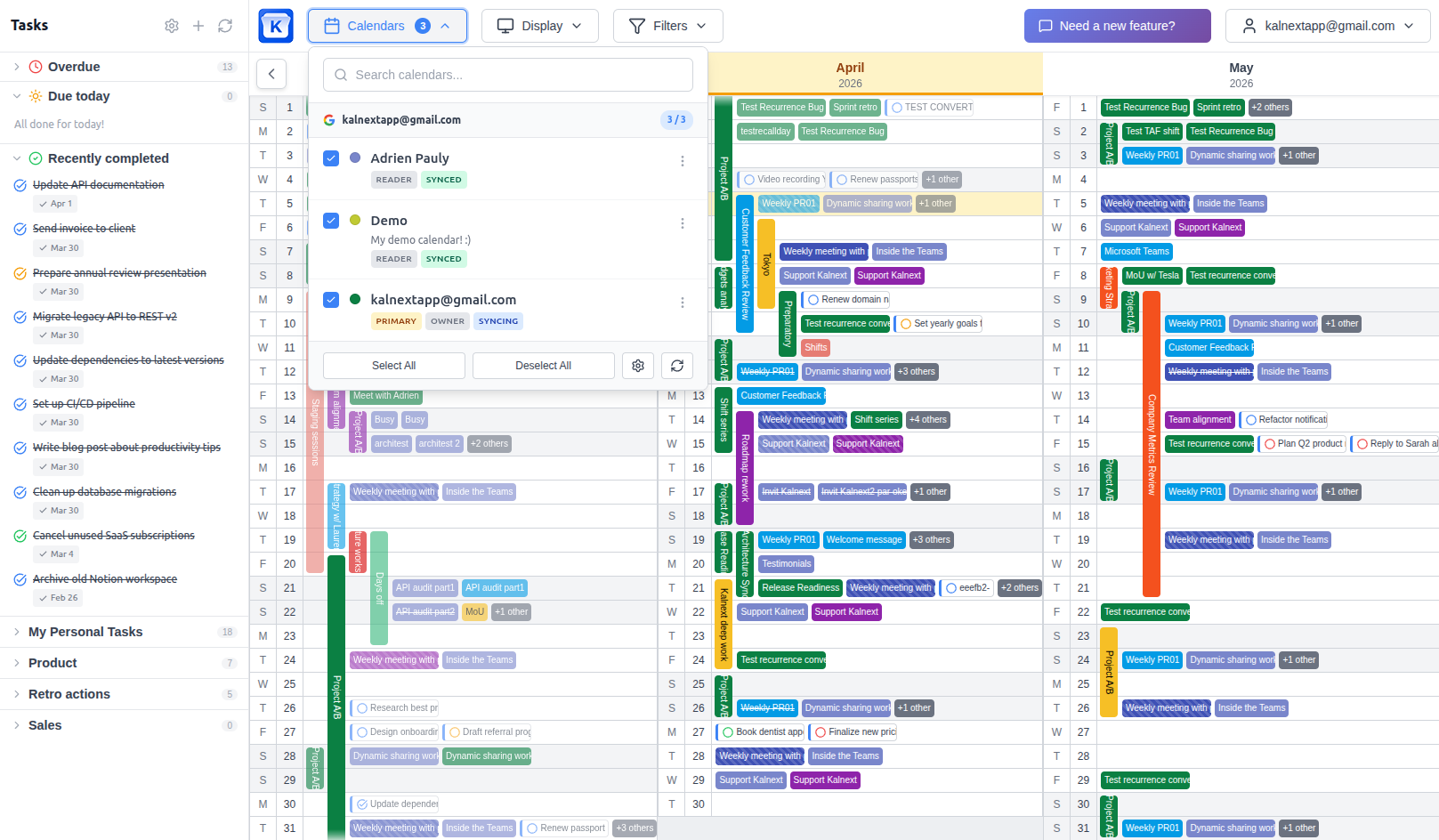
Kalnext is a yearly planner that syncs with Google Calendar and Outlook, including their tasks. Beyond calendar visualization, it offers full event management with drag & drop, task management with duration and importance levels, a free time finder, team collaboration, and dynamic sharing with no audience limits.
TL;DR
Choose AnnuCal if you
- 1Want a standalone planning canvas that does not need a calendar account
- 2Plan alone and want a free plan for a single yearly scenario
- 3Want to sketch several parallel versions of your year side by side
Choose Kalnext if you
- 1Want your year view to edit your real calendar, not a copy of it
- 2Use Microsoft Outlook, which AnnuCal does not support
- 3Need tasks and events together, with duration and importance
- 4Plan with a team and need shared availability and seats
- 5Want to create, drag and resize events that sync straight back to Google or Outlook
AnnuCal vs Kalnext: Features & Pricing
Last updated: October 2026
| AnnuCal | Kalnext | |
|---|---|---|
| Starting price (paid plan) | 8,25 EUR/month, billed yearly (99 EUR/year) | $2/month, billed yearly ($24/year) |
| Free plan | 1 year plan, 3 calendars | No 14-day free trial instead |
| Free trial | 30 days of Pro (no card) | 14 days (no card) |
| Google Calendar sync | One-way import (read-only) | Two-way, real-time |
| Microsoft Outlook sync | No | Yes |
| Edit your calendar from the year view | No | Yes |
| Drag & drop reschedule | Inside AnnuCal only | Writes back to your calendar |
| Drag to resize events | Inside AnnuCal only | Writes back to your calendar |
| Task management | No | Yes |
| Task duration & importance | No | Yes |
| Year view with event details | Yes | Yes |
| Horizontal and vertical layouts | All plans | All plans |
| Weekend-only year view | Yes | No |
| Daily hour-by-hour details | No | Yes |
| Free time finder | No | Yes |
| Advanced filters (color, type, keyword...) | Hide calendars only | Yes |
| Multiple planning scenarios | Yes | No |
| Ready-made templates | 6 templates | No |
| Public holidays | All plans | All plans |
| School holidays | Pro only | No |
| Dark mode | All plans | No |
| Print & export | PDF export, Pro only | All plans |
| Sharing | Links, viewers and up to 2 editors (Pro) | Read-only and dynamic sharing |
| Dynamic sharing (viewers toggle calendars) | No | From Starter plan ($49/month) |
| Embed on a website | Yes | No |
| Team plan with seats | No | Yes |
| Team collaboration (invite teammates) | Up to 2 editors (Pro) | Full collaboration |
| Multiple Google accounts | Not specified | From Starter plan |
| Admin dashboard | No | From Starter plan |
| SSO & SAML | No | Enterprise |
| Custom branding | No | Enterprise |
| Interface languages | English, German | English, French, Spanish, German, Japanese |
AnnuCal vs Kalnext: Pros & Cons
AnnuCal
Pros
- Works without connecting any calendar account
- Free plan for a single yearly scenario
- Multiple scenarios to sketch parallel versions of a year
- Six ready-made templates so you never start from a blank year
- Weekend-only year view, useful for time-off planning
- Embeddable on a website via iFrame
Cons
- Google Calendar import is one-way and read-only: you edit in Google, not in AnnuCal
- No Microsoft Outlook support at all
- No task management
- No free time finder and no daily hour-by-hour view
- No team plan, no seats, no shared availability
- No dynamic sharing: viewers cannot toggle which calendars they see
- PDF export and school holidays are locked behind Pro
- Anything you plan there has to be re-entered in your real calendar
Kalnext
Pros
- Two-way real-time sync with Google Calendar and Microsoft Outlook
- Create, edit, drag and resize events that write straight back to your calendar
- Full task management with duration and importance levels
- Free time finder across all your calendars
- Daily hour-by-hour drill-down from the year view
- Advanced filters by color, event type and keyword
- Team plans with seats, shared availability and an admin dashboard
- Dynamic sharing with unlimited audience on team plans
- Cheaper paid entry point: $2/month against 8,25 EUR/month, so $24/year against 99 EUR/year
Cons
- No free plan (14-day free trial, no card required)
- No planning scenarios or ready-made templates yet
- No weekend-only view, and no week view yet
- Requires a Google or Microsoft account to connect
- No dark mode yet
Why users switch from AnnuCal
Your plan lives next to your calendar, not in it
AnnuCal frames it plainly: "Google Calendar for the day. AnnuCal for the year." The Google import shipped in July 2026 is one-way and read-only, and their own changelog spells it out: "You edit these events in Google, not in AnnuCal." So the year you carefully shaped stays inside AnnuCal. Every block you draw has to be created a second time in the calendar your colleagues actually read, and every change made in Google silently drifts away from the plan you built.
With Kalnext: Kalnext is a year view of your real calendar. You drag a block across three months and the event moves in Google Calendar or Outlook, instantly, for everyone who shares it. There is one system to maintain, not two, and no re-entry step between planning and execution.
No Outlook, at all
AnnuCal supports Google Calendar only, and only as a read-only import. If your organisation runs on Microsoft 365, AnnuCal cannot see your calendar at all. You are back to rebuilding your year by hand.
With Kalnext: Kalnext connects Google Calendar and Microsoft Outlook natively, with the same two-way sync on both. Mixed teams where some people are on Google and others on Microsoft see one shared year.
Events only, so half your year is missing
AnnuCal plans time blocks and nothing else. There are no tasks, no deadlines, no to-do lists anywhere in the product or its pricing table. Meetings show up on the canvas, but the work you actually have to deliver does not.
With Kalnext: Kalnext syncs Google Tasks and puts them on the year view next to your events, with their due dates, plus the duration and importance levels that Google Tasks does not offer on its own. You can drag a task to reschedule it or turn it into an event in one click.
Built for one planner, not a team
AnnuCal sells two plans, Free and Pro. Pro lets up to two other people edit your year, and that is the ceiling: there is no team tier, no seats and no admin dashboard, and viewers cannot filter which calendars they see.
With Kalnext: Kalnext team plans start at $49/month with seats, shared calendars between teammates, a free time finder that works across the whole team, an admin dashboard, and dynamic sharing to an unlimited audience who choose which calendars to display.
Who should use AnnuCal vs Kalnext?
AnnuCal is a good fit if you
- Want a standalone year canvas and do not want to connect a calendar
- Plan alone and a single free scenario is enough
- Like sketching several parallel versions of the same year
- Want to embed a read-only year plan on a website
Kalnext is a better fit if you
- Want your year view to edit the calendar your team already uses
- Are on Microsoft Outlook
- Need tasks and events on the same yearly canvas
- Plan with a team and need shared availability and seats
- Want to publish a year that viewers can filter, not just look at
- Want the cheapest paid plan of the two at $2/month, billed yearly
Don't just take our word for it
"We built our own rolling planning system for our company and needed a way to make this come to life in Google Calendar. We'd been using an open source planner for this but it lacked the user interface, ease of use and support that we needed to scale. Kalnext solved this problem for us."
Rob Castaneda
ServiceRocket · February 2026
"It is a great product! I have dreamed more than 10 years to have this kind of annual viewer/planner since Google did not prepare this option for long."
Ryo Sasaki
International Development Center of Japan · April 2026
How to switch from AnnuCal
No data migration needed. Just connect your Google Calendar or Outlook.
Switching from AnnuCal? Get 30% off your first year.
A welcome offer reserved for AnnuCal users: 30% off your first year on any Kalnext plan. Reach out to claim it.
Contact us to claim your discountSign in with Google or Outlook
One click to connect your Google or Microsoft Outlook account. No sign-up form, no credit card. Your 14-day free trial starts instantly.
Your real calendar appears
Every calendar you already use loads in seconds, with its events, not a copy of them. Nothing to import, nothing to redraw.
Rebuild your AnnuCal blocks once
Recreate the time blocks you had drawn in AnnuCal directly on the Kalnext year view. This time they become real events in Google or Outlook, visible to everyone you share with.
Plan for real
Drag to reschedule, resize to extend, add tasks with duration and importance, and find free time across your calendars. Every change syncs back in real time.
Frequently asked questions
What is the best alternative to AnnuCal for yearly planning? +
If you want your year view to work on the calendar you already use, Kalnext is the strongest alternative. It covers the same 12-month overview and adds two-way sync with Google Calendar and Microsoft Outlook, task management, a free time finder, and team plans with shared availability.
Does AnnuCal sync with Google Calendar? +
Partially. AnnuCal added a Google Calendar import in July 2026, but it is one-way and read-only. Their own changelog states: "The import is one-way. You edit these events in Google, not in AnnuCal." Kalnext syncs two ways in real time, so anything you create, move or resize on the year view is written straight back to Google Calendar.
Does AnnuCal work with Microsoft Outlook? +
No. AnnuCal supports Google Calendar only, and only as a read-only import. Kalnext connects both Google Calendar and Microsoft Outlook natively, with the same two-way sync on each.
Does AnnuCal support task management? +
No. AnnuCal plans time blocks and has no tasks, deadlines or to-do lists. Kalnext syncs Google Tasks onto the year view and adds duration and importance levels that Google Tasks itself does not offer.
How does pricing compare between AnnuCal and Kalnext? +
AnnuCal has a free plan with one year plan and three calendars, and every new account starts with 30 days of Pro, no card needed. Pro then costs 99 EUR per year, or 12,90 EUR per month. Kalnext has no free plan, but its Solo plan is $2 per month billed yearly, so $24 per year: less than a quarter of the price of AnnuCal Pro, with a 14-day free trial that does not ask for a card. Kalnext team plans with seats and dynamic sharing start at $49 per month; AnnuCal has no team plan.
Is AnnuCal good for teams? +
Not really. AnnuCal Pro lets up to two other people edit your year, but there is no team tier, no seats and no admin dashboard. Kalnext team plans give teammates shared calendars, a free time finder across the team, an admin dashboard, and dynamic sharing where viewers choose which calendars to display.
What is time-first planning? +
It is the method AnnuCal is built around: you mark the period of time first on a 12-month canvas, then add the details, rather than starting from a task with a due date. Kalnext works the same way on the year view, with one difference that matters in practice: the block you draw is a real event in your calendar, not an entry in a separate planning tool.
Can I embed a Kalnext year view on a website like AnnuCal? +
Not via iFrame today. AnnuCal supports iFrame embedding of a read-only planner. Kalnext offers dynamic sharing instead: a public link where viewers toggle which calendars they see, with no audience limit on team plans and no account needed to view it.
Compare Kalnext to other planners
Ready to try Kalnext?
See why teams choose Kalnext over AnnuCal. Full access for 14 days, no credit card required.
Start your free trial14-day free trial · No credit card required